
Key Features
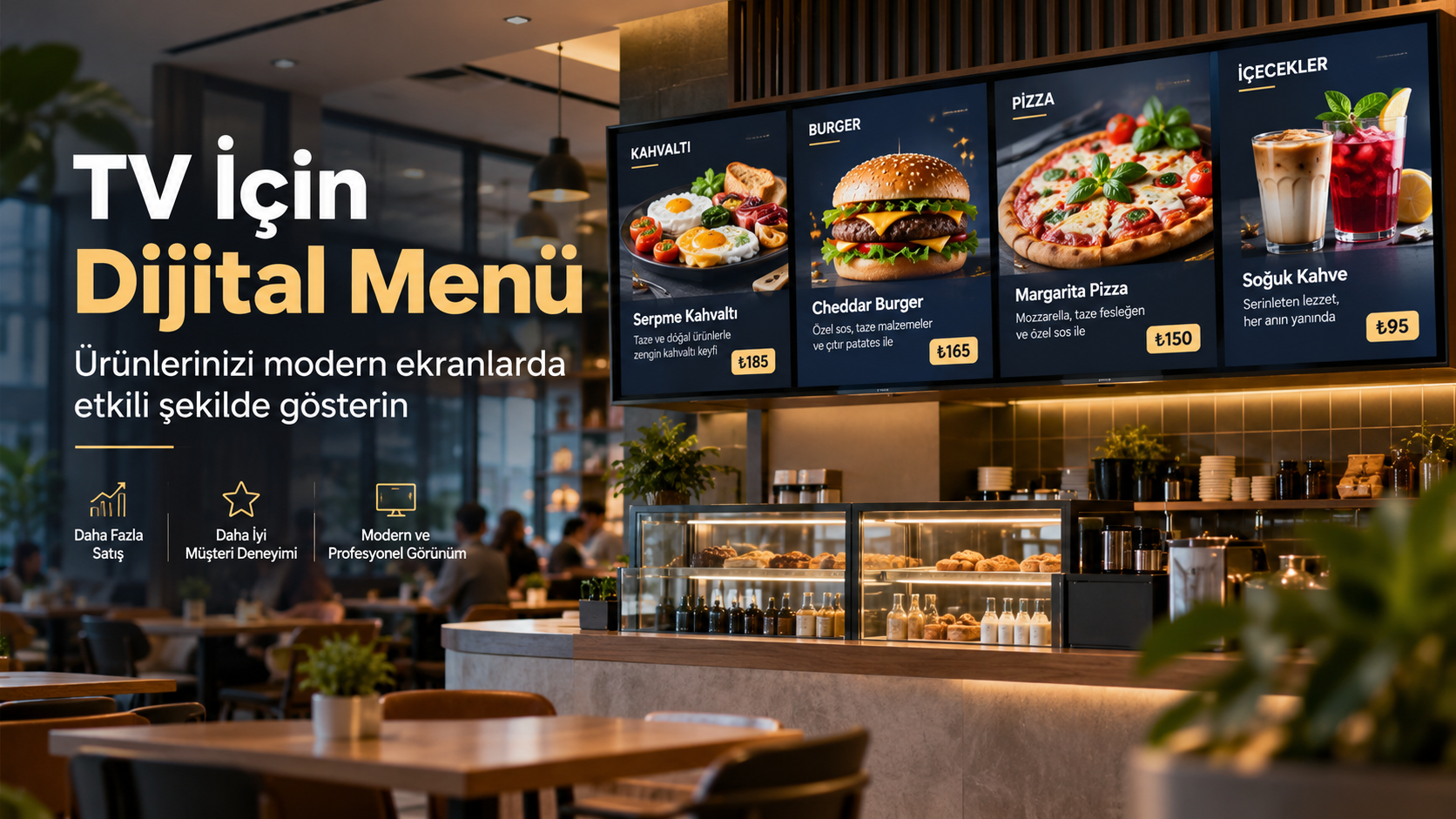
Onpos Digital Menu System for TV
The first few seconds after a customer enters your business are far more valuable than you might think. Where the products are, how easily prices can be seen, how campaigns are presented and how professional the menu looks can all directly influence the purchase decision. For this reason, a digital menu should not be regarded merely as a paper menu transferred to a television screen.
A digital menu system developed for TV is one of the most effective ways to present products on large screens in a more eye-catching, readable and professional way. It can serve a wide range of uses, from restaurants and cafes to fast food businesses, patisseries and any sales point that wants to display product prices on a screen.
The main goal of the Onpos Digital Menu approach is not to create a cluttered advertising image on the screen the customer looks at, but to present the right product with the right information and a strong visual layout.
Displaying the product image, product name, short description, price and, when needed, product-related tags in an orderly way on the same screen makes it easier for the customer to decide.
Especially for businesses that change prices frequently, want to highlight different products during the day or aim to create a more modern customer experience across their branches, a TV digital menu can provide a significant operational advantage.
What Is a Digital Menu
A digital menu is a digital display system that lets a business show customers its products, prices, descriptions and images on televisions or suitable digital screens.
With classic printed menus, when a product or price changes, a new design may need to be prepared and reprinted. In digital screen systems, content is prepared electronically and transmitted to the screen.
An important distinction needs to be made here.
A digital menu for TV and a QR menu are not the same thing.
While a QR menu focuses on the customer opening the menu on their own phone, a TV digital menu screen focuses on presenting products on a television or digital screen inside the business that customers can see.
For businesses that want menu access by phone, Onpos's existing Onpos QR Menu solution is also worth reviewing. The Onpos QR Menu page states that the system offers a digital menu solution for restaurants, cafes, hotels, beach clubs and fast food businesses.
These two systems do not have to be alternatives to each other.
When a customer enters the business, they can see the products on the large television, and once seated at the table they can examine them in more detail through the QR menu.
Who Is a Digital Menu for TV Suitable For
If customers in a business need to see products and prices quickly, a digital menu screen is worth considering.
Strong use cases can emerge especially for the following types of businesses.
Restaurants
In restaurants, main dishes, products of the day, set menus, drinks, campaigns and special products can be shown on a digital screen.
Customers can decide what to order more easily before reaching the register.
Cafes
Coffee varieties, hot and cold drinks, desserts, breakfasts and daily products can be presented attractively on a television screen.
Especially in cafes with a wide product range, it is important for customers to understand the menu quickly.
Fast food businesses
In the fast food sector, decision-making time is short.
Burger menus, pizza varieties, wraps, drink options, extra products and campaigns can be shown directly on the screen.
Patisseries
Supporting cakes, desserts, pastries, breakfasts and drink options with product images can make the customer's choice easier.
Buffets
In buffets where sales move quickly, having product prices on a large screen that customers can see can reduce the staff's need to constantly repeat prices.
Hotels
Digital screens can be considered in hotel restaurants, pool areas, bars, cafes and other food and beverage points.
Multi-branch businesses
For brands with multiple locations, menu and campaign management becomes more critical.
For example, one branch may need to highlight a different product while another branch applies a different price or campaign.
The content prepared about multi-branch POS software can also be reviewed by businesses that want to examine Onpos's centralized management approach on the POS side. Onpos's existing multi-branch content discusses the importance of centrally managing the sales, checkout, stock, order and operational movements of different locations.
What Problems Does a Digital Menu Solve
An attractive menu is of course important, but for a business the issue is not only design.
The real problem is delivering up-to-date information to the customer as quickly and accurately as possible.
The constant need for reprinting
On printed price lists, even a small price change can create a need for new printing.
In businesses with many products, this creates both time and cost burdens.
A TV digital menu allows this process to be carried out digitally.
Showing customers outdated prices
When a price changes, a mismatch between the price at the register and the price on the wall can turn into a trust issue for the customer.
One of the most important advantages of digital systems is that they simplify the content update process.
Products not attracting enough attention
A good menu cannot be created by simply writing product names.
The right product image, description, price and visual hierarchy can help the customer perceive a product more quickly.
Campaigns going unnoticed
A business may prepare an excellent campaign, but if the customer does not see it, its commercial value decreases.
Digital screens can make it easier to present campaigns within the customer's field of view.
Menu clutter
If there are too many products on the menu, it becomes harder for the customer to decide what to buy.
A well-prepared digital menu design should present products within a clear visual hierarchy instead of piling every product on the customer at once.
Key Features of a TV Digital Menu System
In a digital menu project, ease of use should be evaluated before the number of features.
The structure the business genuinely needs should be built.
Product image display
A good food or product photo is one of the strongest visual elements supporting the purchase decision.
In digital menu design, the product image should be used at a sufficient size.
However, covering the entire screen with an image and making the price or product name invisible is not right either.
Product name
The product name should be large enough to be read from several meters away.
Using small fonts on a digital menu screen, as on a desktop website, is one of the most common design mistakes.
Product description
A short description can be used for products that need it.
For example, the ingredients of a burger or the portion size of a coffee can be shown.
However, keeping the description unnecessarily long turns the screen into a brochure.
Price display
Price display on a digital menu is one of the most critical areas of screen design.
Immediately after seeing what a product is, the customer should be able to find its price comfortably.
Rather than deliberately shrinking the price or hiding it on the screen, showing it readably creates a healthier user experience.
Product tags
Short tags can be used according to the business's product structure.
For example,
New
Best Seller
Product of the Day
Spicy
Vegetarian
On Promotion
short labels like these can make it easier for the customer to scan the menu.
Here, the tag structure should be determined according to the business's actual product information.
Why Are Different Digital Menu Designs Important
Not every business's screen is the same.
Nor is every restaurant's product structure the same.
For this reason, forcing a single design on all customers is not a good approach.
One business may want to show two products prominently at the same time.
Another business may want to introduce a single product with a large image.
Yet another business may need to show many products grouped into categories.
For this reason, professional digital menu software should not be thought of as merely a tool for swapping products.
Design and presentation options matter as well.
Single-Product Digital Menu Design
The single-product design is powerful especially for businesses that want to highlight a specific product.
On the screen,
a large product image
the product name
a short product description
the price
and the relevant tag
can be used as the key pieces of information.
For example, imagine a business wants to promote a newly launched hamburger, the coffee of the day or a special dessert.
In this case, dedicating the screen to a single product instead of dividing it among dozens of products can direct the customer's attention straight to that product.
Two-Product Digital Menu Design
On vertical televisions, the screen can be divided into two main areas so that two different products are shown at the same time.
This structure can be used especially for comparative selling.
For example,
a hamburger and a drink
two different coffees
two different pizzas
two different desserts
the day's two special products
alternatives like these can be presented side by side or one above the other.
The main goal here is not simply to split the screen in two.
It is for each of the two products to have a balanced product card of its own.
Horizontal TV Digital Menu Usage
Horizontal televisions can be preferred especially for menu boards above the register.
The wide screen helps present different categories at the same time.
For example, the screen
Burgers
Combo menus
Drinks
Extras
can be divided into sections like these.
However, just because the screen is horizontal does not mean dozens of products should be squeezed onto a single screen.
Readability should always come before the number of products.
Vertical TV Digital Menu Usage
A vertical digital menu is an eye-catching format in modern stores and restaurants.
A vertical screen can be considered especially in areas where the product image is meant to stand out.
A single-product campaign, a two-product comparison or campaign-focused presentations are very well suited to a vertical screen.
Here, it is important that the design is prepared according to the television's actual orientation of use.
Squeezing a horizontal design onto a vertical television does not look professional.
What a Digital Menu Provides to Your Business
A correctly implemented digital menu system is not merely a decorative screen.
A more professional business appearance
When customers enter the business, they see an up-to-date, readable and orderly screen.
This small detail can show how much the brand values technology and the customer experience.
Ease of price changes
For businesses where product prices change frequently, printing processes can create a serious workload.
A digital structure makes content updates more manageable.
Stronger product presentation
A product can be shown not only by name but together with its image, description and price.
Highlighting campaigns
The product of the day or campaigns for a specific period can be brought to the foreground with separate designs.
Reduced load on the sales team
When customers can get basic product and price information from the screen, the same repeated questions directed at staff can decrease.
Brand consistency
Colors, typography and visual layout can be prepared in line with the business's brand identity.
How a Digital Menu Works
The basic working logic is quite simple.
First, the products the business will show on the screen are defined in the system.
For each product, the following is needed:
product name
product image
description
price
tags
and similar information is prepared.
Then a design suitable for the screen is selected and the products are placed in the relevant areas.
The prepared presentation is shown to customers through the TV or digital screen.
The technical setup of the system should be evaluated separately according to the chosen screen, hardware and business infrastructure.
For this reason, when purchasing a digital menu, instead of looking only at the software price, the TV to be used, screen orientation, resolution, number of branches and content update needs should be planned together.
Should Restaurant Software and a Digital Menu Be Considered Together
The digital screen is the presentation layer on the customer side.
Restaurant software focuses on managing the business's behind-the-scenes order, sales and operational processes.
For this reason, users who want to digitalize their business comprehensively should look not only at the menu screen but also at the overall business infrastructure.
Onpos's existing restaurant software solution covers different restaurant operations such as order management, the kitchen display, stock and reporting.
This structure is especially important for companies starting a new business or renewing their existing system.
Because the screen the customer sees and the business's behind-the-scenes operation should not be thought of as two independent worlds.
What Is the Difference Between a Digital Menu and a QR Menu
This is one of the topics users most often confuse.
A TV digital menu displays products on a television or digital screen inside the business,
while a QR menu lets the customer access the menu by scanning a QR code with their phone.
The Onpos QR Menu solution states that customers can scan the QR code on the table to access the menu and browse products.
The two systems serve different purposes but can be considered together.
For example, large digital screens can be placed behind the register while QR menus are used on the tables.
This way, the customer sees the general product range from a distance and can also examine the detailed menu on their own phone.
Differences Between a Classic Menu and a Digital Menu
The strongest side of a printed menu is its simplicity.
It requires no electricity or device.
However, in businesses where products and prices change frequently, the update process can become costly.
The advantage of a digital menu is that the content is presented electronically.
adding a new product
changing a price
showing a campaign
refreshing a product image
changing the menu design
for needs like these, it can reduce the obligation of going through the printing process again.
For this reason, when choosing between a digital and a printed menu, the business's working model should be evaluated.
It is not right to say that the same solution suits every business.
Digital Menu Usage Scenarios
Highlighting different products at lunchtime
A restaurant may want to make its quickly prepared products more visible during lunch service.
These products can be highlighted on the digital menu screen.
A different menu presentation in the evening
If different products stand out in the evening service compared with the lunch menu, the screen content can be arranged accordingly.
Product of the day
A single-product design can be used for a specific product.
The product can be presented to the customer's attention with a large image together with its price.
Campaign screen
A limited-time campaign can be shown with a stronger design than the other products on the menu.
Multi-branch brand usage
In chain businesses, each location's product structure or commercial need may not be the same.
For example, while one product is highlighted in the Marmaris central branch, a different menu or campaign may be desired in the Siteler area branch.
For this reason, multi-branch businesses evaluating a digital menu system must clearly specify their need for branch-based content management at the very start of the project.
What to Consider When Buying a Digital Menu
Finding the cheapest software is not the right criterion for a digital menu investment.
What matters is choosing a system that genuinely fits the business's daily use.
Learn about TV compatibility
Determine in advance how the television or screen model you will use works with the system.
Determine the screen orientation
Decide whether the TV will be used horizontally or vertically.
The design should be prepared accordingly.
Determine how many screens will be used
A cafe with a single screen does not have the same needs as a chain using dozens of screens.
Specify the number of branches
If there are multiple branches, it should be determined whether the same content or different content will be shown in each branch.
Ask about the update method
Learn how product or price changes are made.
Prefer a system that your staff will not struggle with in daily use.
Care about image quality
Low-quality product photos can look even worse on a high-resolution television.
Professional digital menu software cannot fix a poor product photo on its own.
Evaluate the design options
If the system offers only a single template, it can be limiting for different campaign and product needs.
Plan different design needs in advance: single-product, two-product, category-focused or campaign-focused.
Mistakes Made When Using a Digital Menu
Using text that is too small
The customer will not watch the screen from 50 centimeters away like a computer monitor.
Font sizes should be determined according to the actual viewing distance.
Filling the screen with products
Fitting 30 products onto one screen may be technically possible.
But if the customer cannot read them, it has no commercial benefit.
Hiding the price
The price is one of the things the customer is most curious about.
The price should be easy to find in the design.
Highlighting every product equally
A menu without visual hierarchy is tiring.
Products meant to stand out should be shown with different weight within the design.
Using low-quality photos
On a large screen, a bad photo is even more noticeable.
It is important that product photos are as clean, sharp and representative of the actual product as possible.
Using constantly moving content
Motion can attract attention, but if everything is moving, it becomes harder for the customer to focus on product and price information.
The main purpose of a digital menu is not to put on a visual show but to help sell products.
A More Effective Digital Menu with Expert Tips
When preparing a good digital menu, look at the screen through the customer's eyes.
What does the customer see in the first three seconds?
Can they understand what the product is?
Can they find the price?
Does the product photo accurately represent the actual product?
Can the screen be read from a distance?
Is the menu consistent with the brand's corporate identity?
The answers to these questions are more valuable than a list of technical features.
Another important point is ordering the products on the screen according to the sales strategy.
For example, separate screen designs can be considered for high-demand products, new products or products the business wants to highlight in that period.
The goal of a digital menu is not to fill the screen but to make the customer's decision easier.
Let's Define the Digital Menu Setup for Your Business Together
Every business differs in its number of screens, product variety and usage style.
For this reason, it is useful to determine the following information before starting a digital menu project.
Number of TVs
TV screen size
Horizontal or vertical use
Number of branches
Approximate number of products to display
Need for single-product or multi-product designs
How often campaigns will be used
Whether product images will be used
When this information is determined correctly, a structure the business will genuinely use can be built instead of investing in unnecessary features.
To get information about Onpos solutions and the setup suited to your business, the quote form on the Onpos homepage can be used. The Onpos homepage presents restaurant solutions, products and the quote form together.
Demo and Project Consultancy for a Digital Menu
Before buying a digital menu, do not decide by looking only at a screen image.
Evaluate how the system will be applied to your business's actual way of working.
Especially in multi-branch businesses, which screen will show which content, how product changes will be managed and how different screen designs will be used should be planned at the start of the project.
If you are considering digitalizing the entire restaurant operation, you can review Onpos Restaurant Software; if you want digital menu access by phone at the table, you can also review the Onpos QR Menu solution as well.
Frequently Asked Questions
What is a digital menu?
A digital menu is an electronic menu structure that lets products, prices, images and descriptions be shown to customers on televisions or suitable digital screens.
How does a digital menu for TV work?
Product information is prepared digitally and shown to customers through the television or a suitable screen in the business. The technical structure to be used should be determined according to the TV and the business infrastructure.
Is a Smart TV required for a digital menu?
This depends on the preferred technical infrastructure. It is advisable to share your current TV brand and model before the project and confirm compatibility.
How are digital menu prices determined?
Pricing can vary according to the system used, the number of screens, the branch structure, design needs and the requested features. For this reason, it is healthier to get a quote based on the business's needs.
Is it possible to change prices with a digital menu?
One of the main advantages of digital menu systems is that product and price information can be managed electronically. The update method can vary depending on the infrastructure used.
Can a vertical TV be used as a digital menu?
Yes, with suitable technical infrastructure and a design prepared for a vertical screen. If vertical use is planned, it is important that the design is prepared for this screen ratio from the start.
Can a digital menu be used outside restaurants?
Yes. It can be considered in cafes, patisseries, buffets, hotels and similar businesses that need to display products and prices.
Are a digital menu and a QR menu the same thing?
No. A TV digital menu shows products on the business's screen, while a QR menu focuses on the customer accessing the menu through their own phone. The two solutions can also be used together in the same business.
Can multi-branch businesses use a digital menu?
Yes, they can. However, the need to show the same or different content across branches should be determined before the project. In a multi-branch structure, screen and content management should be planned correctly from the start.
Can product images be used in a digital menu?
Yes. The product photo is one of the most effective elements of a digital menu. It is important that the image is high quality and accurately represents the actual product.
Can campaigns be shown on a digital menu?
Depending on the system's design structure, campaigns or specific products can be planned to stand out. On campaign screens, the product, price and campaign information should be easy to read.
Can a digital menu be used together with a POS system?
The digital menu focuses on presenting products to customers, while the POS system focuses on the business's sales and operational processes. The structure to be used together and integration needs should be evaluated specifically for each business.
Turn Your TV Screen into a Part of Your Point of Sale
The television in your business does not have to be merely a decorative screen.
A properly designed digital menu lets you present your products in a way customers easily understand, make your prices visible, highlight your campaigns and give your business a more modern customer experience.
However, the secret of a strong digital menu is not more colors, more animation or more products crammed onto the screen.
What really matters is that, the moment the customer looks at it, they
see the product,
understand what it is,
learn its price,
can make a decision easily
and receive the business's up-to-date information correctly.
When the need is analyzed correctly — from a small business with a single television to chains using screens in different branches — a digital menu can become a powerful part of the customer experience and in-store communication.
To get information about Onpos Digital Menu, evaluate your business's screen setup and request a quote for a solution suited to your needs, you can contact Onpos and submit a quote request.
Shall we make your work easier?
Fill the form and our expert team will call you shortly. We'll prepare a custom demo and quote for your business.