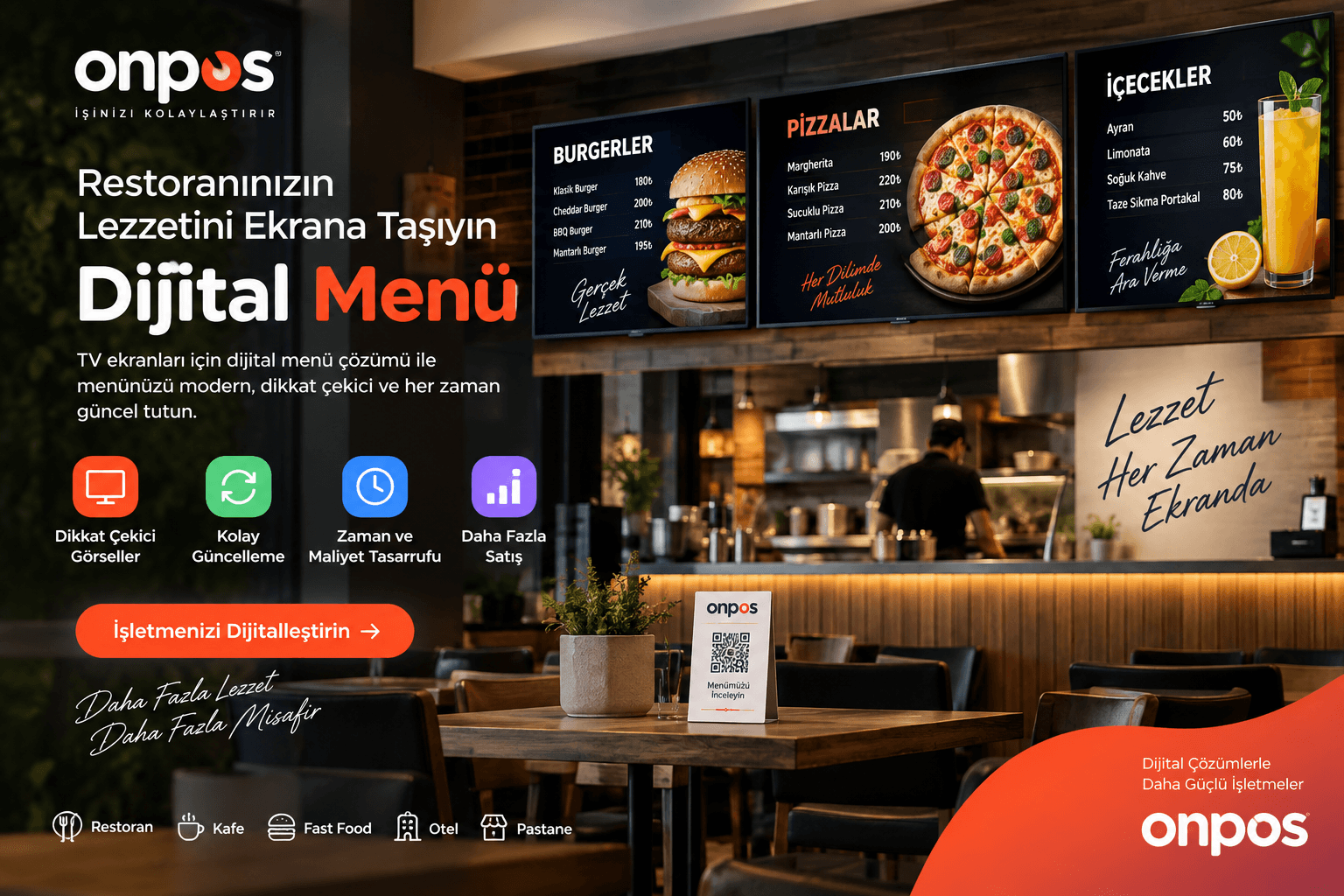
For restaurants, cafés, fast food businesses, patisseries, buffets, hotels, beach clubs and other food and beverage businesses, how the menu is presented is now just as important as the products themselves. The digital menu a customer encounters the moment they walk in makes products look more striking, prices easier to read and campaigns far more effectively promoted.
Onpos TV Digital Menu is a modern digital menu system designed to let businesses centrally manage their televisions and professional digital displays.
While classic printed menu boards require redesign and reprinting to change a price, add a new product or refresh a campaign, a TV digital menu system lets the content shown on screens be changed digitally.
The system delivers an even greater advantage especially for businesses with more than one branch. Headquarters can broadcast the same content across all branches or send each branch its own menu, product, price, campaign or visuals.
This way, the digital menu stops being a screen that merely shows products and becomes a powerful, centrally managed sales and communication channel for the business.
What Is a Digital Menu?
A digital menu is a system that presents food, beverage, product, price, campaign and promotional information to customers via televisions, Android screens or professional digital displays instead of classic printed materials.
Digital screens that make it easier for customers to decide at the ordering point have become one of the important parts of modern menu presentation in restaurant and café businesses.
In the Onpos TV Digital Menu system, the aim is not simply to project a fixed menu image onto a television.
The system's core approach is to create centrally manageable digital menu screens rather than static visuals.
The business manager can arrange products, prices, product descriptions, images and campaign areas according to their needs.
This structure provides significant operational ease, especially in businesses where prices and campaigns change frequently.
How Does the TV Digital Menu System Work?
The Onpos TV Digital Menu system works on the principle of preparing the business's menu content digitally and displaying it on TVs or compatible screens.
Menu management can be carried out through the central panel.
Business managers can determine which products appear on screen, change prices, update product images and use different designs when needed.
For example, a business showing a breakfast menu in the morning can switch the screen content to a lunch menu during the day and then to a dinner menu.
In fast food businesses, burgers, pizza, wraps, drinks or menu bundles can be shown in separate areas.
One of the most important aspects of this system is the screen's ability to change according to the business's operations.
A digital menu design does not have to consist only of a price list.
A product photo, product name, short description, price, discounted price, campaign label, new product information and various visual areas can all be used on the same screen.
Remote Menu Management with Onpos TV Digital Menu
One of the strongest advantages of a business using a digital menu is the remote menu management capability.
It does not suit the digital management approach for a business manager to stand in front of every television and change content with a USB stick.
In modern systems, the core aim is to be able to control the screens from a central structure.
With Onpos TV Digital Menu, businesses can organize their menu content on a centralized management basis.
This feature provides great convenience especially when managing screens located in different places.
For example, an authorized person at the head office can change the menu broadcast at the Marmaris branch while sending a different menu to the screen of a branch in another city.
This way, digital menu screen management can be carried out without physically going to the branch.
Multi-Branch Digital Menu Management
For chain restaurants and multi-branch businesses, one of the biggest needs is being able to provide central control and local flexibility at the same time.
In the Onpos infrastructure, the centralized management approach already forms an important structure for multi-branch businesses. The TV Digital Menu solution aims to carry this approach into screen management.
With a multi-branch digital menu system the business can manage each branch's screen content separately.
For example, a restaurant chain may need to display
a different menu at its Marmaris branch
different prices at its Bodrum branch
a regional campaign at its Fethiye branch
different product groups at its Istanbul branch
on its screens.
Each branch's customer base, product range and pricing policy do not have to be the same.
That is why a professional digital menu board system must go beyond a simple screen setup that sends the same image to every branch.
The structure targeted with Onpos TV Digital Menu provides branch-level content control alongside centralized management.
Consultation: Let's Plan a Digital Menu Setup Tailored to Your Multi-Branch Business
If you have more than one branch, how many screens will be used, which screens will broadcast shared content and which branches will have independent menus should all be planned correctly from the start.
By evaluating your business's branch and screen structure with the Onpos team, you can create the digital menu scenario that suits you.
What Is a Digital Menu Board System?
On Google, digital menu board, digital menu boards, TV menu system, restaurant TV menu, menu screen and digital price menu are among the different queries people use.
The menu board concept refers especially to the large menu screens behind the counter in restaurants and quick-service businesses.
In traditional methods, illuminated prints or fixed price boards are used in these areas.
In digital menu board systems, televisions or professional screens are used instead.
This change gives the business a very important advantage.
The content on the screen can be changed.
When a new product comes out, there is no need to have a new sign made.
When a price changes, there is no need for reprinting.
When a campaign starts, there is no need to prepare a sign weeks in advance.
Menu management becomes far more dynamic.
Digital Menu for Restaurants
In restaurants, speeding up the customer's decision-making process matters.
Especially in self-service businesses and those taking orders at the register, whether the customer has decided what to order by the time they reach the register directly affects transaction speed.
That is why a restaurant digital menu system must focus on presenting products in an easy-to-read and eye-catching way.
Menus supported by product images can help customers evaluate different alternatives more quickly.
Depending on the business's needs, the digital screen can show information such as
the product photo
the product name
the product description
the price
the promotional price
a new product label
a best-seller label
the menu contents
and similar details.
A well-prepared digital menu screen does more than inform the customer. It also strengthens product communication at the point of sale.
You can review Onpos's existing software solutions for restaurant businesses on the Onpos Restaurant Program page. Onpos Restaurant Program
TV Menu System for Cafés
Cafés usually have a large product variety.
Coffee varieties, hot drinks, cold drinks, desserts, sandwiches, breakfasts and seasonal products can all be found within a single menu.
Presenting this many products clearly on a classic signboard can be difficult.
A café digital menu system allows screens to be used on a category basis.
One screen can show coffee products while another shows desserts.
Another screen can be used for campaigns or new products.
This way, the TV screens behind the counter become not just a decorative element but an active sales area.
Digital Menu Board for Fast Food Businesses
Fast food businesses are among the business types where digital menu board technology can be used most intensively.
Customers want to decide quickly at the ordering point.
That is why prices, product images and menu combinations need to be easy to understand.
Burger menus, pizza varieties, döner options, drinks, extra items and campaigns can be distributed across different screens.
It is also possible to highlight certain products with larger visuals.
This structure can be changed according to the business's seasonal sales strategy.
Digital Menu for Döner and Kebab Businesses
In döner, kebab and quick-service restaurants, price changes and product combinations can occur frequently.
Portion, wrap, sandwich, drink-included menu or different weight options need to be shown clearly to the customer.
Thanks to the TV digital menu, products can be divided into categories and price information can be presented to the customer in a more readable way.
For example, while one screen shows döner varieties, another screen can be used for menus and drinks.
Digital Menu for Patisseries and Bakeries
The use of digital menus is not limited to restaurants.
Patisseries, bakeries and dessert businesses can also present their products on digital screens.
Cake varieties, daily desserts, breakfast options, drinks and special campaigns can be shown on TV screens.
In businesses where visual selling matters, using quality product photos can help direct the customer's attention to specific products.
Digital Menu in Hotel and Beach Club Businesses
Hotels can have different product groups in their restaurant, bar, pool, beach and lobby areas.
Even within a single business, different menus may need to be shown at different points.
That is why a centrally manageable hotel digital menu system provides an important advantage.
While a drinks and cocktail menu is shown in the beach area, a food menu can be broadcast on the restaurant screens.
For menus accessed by phone, businesses can also use Onpos's existing QR Menu solution. Onpos QR Menu
The important distinction here is this.
TV Digital Menu shows content to the customer on a physical screen.
QR Menu lets the customer reach the menu by scanning the QR code with their phone.
The two systems do not have to be alternatives to each other. In the right business scenario, they can be positioned as complementary digital customer experiences.
Vertical TV Digital Menu
Not every digital menu screen has to be used horizontally.
Especially in narrow wall areas or at points where a single product is to be promoted strongly, a vertical digital menu screen can be used.
In vertical screen designs, the product photo, description, price and campaign label can be shown in larger areas.
For single-product campaigns, the entire screen can be devoted to one product.
For example, a new burger, a special coffee, a pizza or the menu of the day can be highlighted using the full screen.
Thanks to the different screen templates to be prepared for Onpos TV Digital Menu, the business can create content by choosing a suitable template instead of commissioning graphic design from scratch for every campaign.
Horizontal TV Digital Menu
Horizontal screens are advantageous especially for behind-the-counter restaurant and fast food menus.
Multiple products can be displayed side by side on the same screen.
In category-based use, the horizontal screen area allows a wide product distribution.
The business can use a single screen or line up multiple TVs side by side to create a wide digital menu board area.
In this case, the screens' roles can be separated.
For example, one screen can show main dishes, another drinks and another campaigns.
Price Changes in a Digital Menu
One of the biggest problems with classic menu signs is price changes.
When a product's price changes, the old price on the sign has to be replaced.
This can create reprinting, foil, signage or graphic design costs.
With a digital price menu in place, price management can be carried out through software.
Especially in periods when prices are updated frequently, this feature significantly eases the business's operations.
The same advantage becomes more pronounced in chain businesses.
Headquarters can update the prices of specific branches when needed.
Using a Digital Menu in Campaign Management
TV screens should not be thought of only as areas where the standard menu is displayed.
Used correctly, they are a powerful communication channel for delivering campaigns to customers.
A newly launched product, a lunch campaign, a menu for two, a discounted drink or a seasonal item can be highlighted on screen.
When the campaign ends, the content can be removed and another campaign can be broadcast.
This gives the business a more flexible working structure compared to printed campaign materials.
Consultation: Turn Your Existing TV Screens into Digital Menus
If your business already has TVs or suitable screens, you can evaluate your device setup with the Onpos team and get information about its suitability for digital menu use.
By sharing the number of screens you need, your horizontal or vertical usage preference and your branch structure, you can create a setup tailored to your business.
What Is the Difference Between a Digital Menu and a QR Menu?
These two concepts are sometimes confused with each other.
A TV digital menu is the menu shown collectively to customers on the business's televisions or professional screens.
A QR menu is the digital menu customers access from their own phones.
A TV menu mainly lets the customer see the products and prices as they approach the register.
A QR menu, on the other hand, allows the customer to browse the menu on their own device at their table or wherever they are.
It is stated that in the Onpos QR Menu system, product images, prices, descriptions, allergen information and campaigns can be displayed and content can be updated through the management panel. Onpos QR Menu System
Using the two solutions together can make the restaurant's digital menu infrastructure more comprehensive.
Multi-Screen Digital Menu Management
In large restaurants and cafés, a single screen may not be enough.
When multiple screens are used, it is not necessary for every television to show the same content.
Each screen can take on a different role.
This way, the business can divide product categories across screens and make it easier for customers to read the menu.
For example, while one screen is devoted to main products, a second screen can show drinks, a third desserts and a fourth campaigns.
This structure represents an important use case for businesses looking for a multi-screen digital menu system of their own.
Why Is Centralized Digital Menu Management Important?
In a single-branch business with one or two screens, manual management may be possible to a certain extent.
But as the number of screens and branches grows, manually changing content turns into an operational problem.
Consider a restaurant chain with ten branches and four screens in each.
That structure means forty screens in total.
Updating forty different screens on site at every price change is not efficient.
That is why, in a professional setup, centralized digital screen management should be the core requirement.
Onpos's existing restaurant chain management approach also includes functions such as branch management and centralized definition.
Positioning the Digital Menu project within a multi-branch structure is also compatible with the Onpos ecosystem's general management approach.
Why Is Digital Menu Design Important?
The design shown on the screen matters just as much as the technology.
Cramming all the products onto a single screen in small type can reduce the digital menu's advantage.
Customers should be able to see the product name and price easily when looking from a few meters away.
That is why visual hierarchy matters in the designs.
The product name should be prominent
the price should be easy to read
the product image should be high quality
the campaign label should be eye-catching
the description should be short and clear
All of these should hold true.
While simple, large-visual designs can be used for single-product campaigns, category-based screens may be preferred for extensive menus.
What to Consider When Choosing a Digital Menu
When buying a digital menu software product, simply checking whether it shows visuals on screen is not enough.
The business's growth plan should be considered.
In particular, screen management, branch management, authorization, remote updating, design options and the compatibility of the devices used should all be evaluated.
Multi-branch businesses should definitely check before purchase whether the system can send different content to each branch.
In addition, horizontal and vertical usage scenarios for the screens, the internet connection requirement and how content updates will be carried out should be clarified.
The guide Onpos prepared about its multi-branch POS system also recommends that businesses verify topics such as device compatibility, integration, growth goals, and branch and user structure before purchase. Multi-Branch POS Software Guide
Who Is Onpos Digital Menu Suitable For?
Onpos TV Digital Menu can be considered especially for restaurants, cafés, fast food businesses, döner shops, kebab houses, pizzerias, patisseries, bakeries, buffets, beach club businesses, hotels, chain restaurants, franchise businesses and any business that wants to show products and prices to customers on a screen.
Single-branch businesses can digitalize their printed menu boards.
Multi-branch businesses, meanwhile, can move their digital screens into a centralized management structure.
Digital Restaurant Management with the Onpos Ecosystem
Although TV Digital Menu is a promotional and menu screen solution that can be used on its own, it can also be considered part of the same digital transformation approach as Onpos's other restaurant technologies.
Onpos's existing Restaurant Program includes order management, stock and recipe management, reporting and various business management functions.
Businesses that want a digital menu experience over the phone can evaluate the Onpos QR Menu solution as well. Get information about Onpos QR Menu
For displaying prices digitally on the grocery and retail side, the Electronic Digital Shelf Label solution is also among Onpos's services. Electronic Digital Shelf Label
Thanks to this structure, complementary digital solutions can be positioned under the Onpos brand, from register and restaurant management to QR menus, and from digital price display to TV menu screens.
Consultation: Let's Plan the Right TV Digital Menu Solution for Your Business Together
Not every business has the same menu structure.
The needs of a single-branch café and those of a restaurant chain with dozens of branches are naturally different.
That is why it is not right to approach a digital menu project only in terms of how many televisions will be used.
The number of branches, the number of screens, whether the screens are used horizontally or vertically, the number of products to be shown, the frequency of price changes, campaign management and the need for central management should all be evaluated together.
Onpos TV Digital Menu lets you turn the televisions in your business from classic display screens into a manageable digital menu area.
You can showcase your products more professionally, manage price changes more easily, highlight your campaigns and broadcast different menus at your different branches.
For detailed information about Onpos's restaurant management and digital solutions, you can browse the Onpos main website. Onpos Restaurant, Café and POS Solutions
What is a digital menu?
A digital menu is a modern menu system that presents product, price, description, image and campaign information to customers on televisions or digital screens.
How does a TV digital menu work?
Menu content is prepared digitally and broadcast on compatible televisions or screens. In systems with a centralized management structure, content can be changed remotely.
Can digital menu prices be changed remotely?
One of the system's core aims is for product and price content to be managed centrally. The devices to be used and the project structure should be technically verified before purchase.
Can a different digital menu be sent to each branch?
A multi-branch structure is one of the product's important use cases. Different screen content can be created according to the branches' product, price and campaign structure.
Can a digital menu be used on horizontal and vertical TV screens?
Designs can be prepared for both horizontal and vertical screen use. A template suitable for the screen's physical position and resolution should be chosen.
Are QR Menu and TV Digital Menu the same thing?
No. The TV Digital Menu shows content on the screens inside the business, while the QR Menu lets the customer access the menu from their phone via a QR code.
Can multiple TVs show different menus?
In a multi-screen setup, different product categories or campaign content can be assigned to different screens. The technical scope should be determined according to the screens and devices to be used in the project.
What is the advantage of using a digital menu in restaurants?
It makes managing price and product changes easier, can reduce the need for printed menus, allows campaigns to be changed quickly and helps products be presented more professionally.
Can digital menus be used in cafés?
Yes. Coffee, drinks, desserts, food and campaigns can be shown on different screens or in different sections.
Is a digital menu suitable for multi-branch restaurants?
Centralized screen and content management offers an important advantage especially for multi-branch businesses. It is possible to use the same menu in every branch or different menus tailored to each branch.
How is a digital menu demo request created?
Through the Onpos website, you can request information and a demo by specifying your business's number of branches, number of screens and usage scenario.